TVCastHub
- 2.9
- Rating
- 10.00K
- Installs
- Free
- Price

 Analysis by App-foxy
I tested TVCastHub as a simple way to move video from a phone to a television or another compatible screen, and my first impression is that it aims at a very familiar household problem: one person finds something on a phone, while everyone else wants to watch it on a larger display. The app is free to install, belongs to the tools category, and is made by Bloomscape Interactive. Its purpose is narrow, which is both its main appeal and its main limitation.
When casting works smoothly, the benefit is immediate. Instead of passing a phone around the sofa, I can use the handset as the starting point and let the television become the shared viewing surface. That makes TVCastHub most interesting for casual home use, especially when the people in the room do not want to sign into the same service on the television or search with a remote.
How TVCastHub fits into a shared home
A realistic use case is a family or group of friends choosing a video together. One person has the content open on a mobile device, another is already sitting near the TV, and the group wants to put it on the big screen without turning the process into a technical project. TVCastHub can serve as the bridge between those two devices, provided the television or display is compatible with the casting method the app expects.
You May Also Like

 AccuWeather: Weather Radar
AccuWeather Review: A Quick, Clear Forecast for Everyday Decisions
For everyday plans, the best forecast is the one you can understand quickly. AccuWeather makes rain timing, radar, and local conditions easy to act on, with a few trade-offs.

 Hill Climb Racing
Why Hill Climb Racing Still Turns Crashes Into One More Run
A tiny car, a bumpy hill and one more upgrade: Hill Climb Racing keeps resurfacing because its simple chaos makes every near-miss feel personal.

 AliExpress - Shopping App
AliExpress Makes Global Shopping Feel Personal, but Shoppers Bear the Risk
AliExpress turns a global marketplace into a pocket-sized discovery engine. Its reach is useful, its shopping loop compelling, and its trade-offs easy to miss.

 Lords Mobile: Kingdom Wars
Lords Mobile Is a Kingdom-Building Routine, Not a Quick Match
A case-by-case verdict on the building, battles, device demands, and social commitments that make Lords Mobile rewarding for some players and exhausting for others.

 PDF Scanner app - TapScanner
TapScanner Makes Paperwork Easier to Capture, Check, and Share
TapScanner makes scanning with a phone feel less like a rescue operation and more like a dependable step in getting work done. Its capture tools are useful, though not flawless.

 Block Blast!
 Shows How Much a Puzzle Game Can Leave Out
A quiet grid game shows why puzzle players increasingly value instant clarity, repeatable skill and low-pressure play—and where the genre still needs to catch up.
More From Our News Desk
View All News


I like this phone-first approach because it keeps discovery quick. Searching, scrolling, and selecting content are generally easier on a touchscreen than with a television remote. It also helps when the person who found the video is not the person who normally manages the TV. In a shared room, that small change can reduce the usual back-and-forth over who controls playback.
There is an important distinction, though. Casting a video is not the same as turning the phone into a universal remote for every television or every streaming service. The experience depends on the receiving screen and on the source of the video. If the display does not support the relevant connection method, or if the content source restricts casting, the app cannot remove those limitations. I would check compatibility before relying on it for a planned group movie night.
For short clips, personal videos, and informal viewing, the concept makes sense. For a household that expects one app to replace built-in television apps, HDMI connections, and every service-specific casting button, expectations should be lower. TVCastHub is better understood as a convenient casting tool than as a complete home entertainment platform.
What the first setup feels like
The first thing I would do is put the phone and the receiving screen on the same home network, then open TVCastHub and look for the display. This is the kind of setup step that sounds obvious but causes most casting frustration. If the phone is using mobile data while the TV is connected to Wi-Fi, discovery may fail even though both devices are online. A guest network can create the same problem by separating devices from one another.
I also recommend turning on the television before opening the app. That gives the app a better chance of seeing an available target, and it makes it easier to identify the correct screen when several devices are nearby. In a shared home, naming can matter: selecting the wrong display is an easy mistake when a living room TV and a bedroom TV appear together.
One useful habit is to test the connection with a short, unimportant video before gathering everyone around. That reveals whether the display is discoverable and whether the source behaves properly. It also prevents a common household problem: spending several minutes troubleshooting while children or guests wait for the program to begin.
The app runs on Android versions starting with 5.0, so its stated compatibility reaches back to older Android devices. That is helpful if an older spare phone is used as the household casting device. Still, compatibility with the phone itself is only one part of the chain. The receiving screen, network arrangement, and video source all affect the result.
Keeping device roles clear
Shared-device use works best when everyone understands which device is doing what. The phone is normally the controller and discovery tool, while the television is the viewing surface. If another person opens the app on a second phone and tries to connect at the same time, the household may need to agree on who is currently managing playback.
This is not a criticism unique to TVCastHub; it is a practical consequence of phone-based casting. The app does not automatically solve social coordination. In my experience, a simple spoken rule works better than repeatedly tapping buttons: one person chooses the video, and another person can suggest the next one without interrupting the current connection.
That arrangement is especially useful when several people share a living room but do not share the same accounts. Each person can keep their own viewing identity on their own phone rather than handing over passwords or leaving a personal profile open on the television. However, the app should not be treated as an account-management tool. It helps move video to a screen; it does not create a shared household profile or define who is allowed to use a streaming account.
For guests, I would use a temporary, low-risk workflow. Let the guest select the content on their own phone, cast it, and disconnect when finished. That avoids leaving browsing history, saved credentials, or personal recommendations on a communal device. The approach is more respectful of account boundaries than asking everyone to log into the same television application.
Account boundaries and everyday privacy
One of the more useful trade-offs is that casting can reduce the need to expose a personal account on a shared TV. If the content is already available on the phone, the television may only need to display what the phone sends or directs it to play. That can be more comfortable in a home where adults, teenagers, and visitors use the same screen but do not want identical recommendations.
At the same time, I would not assume that casting creates complete privacy. The phone still shows what is being searched for and selected, and anyone holding the phone may see the account or browsing context that belongs to its owner. TVCastHub should therefore be used with the same care as any other app that sits between personal content and a shared display.
There is also a practical handoff issue. If the original phone leaves the room, loses its connection, or runs out of battery, playback may become inconvenient depending on how the receiving device handles the session. For longer viewing, I prefer keeping the controlling phone charged and nearby. That is a small preparation step, but it matters more than people expect when the app is being used for a full evening rather than a quick clip.
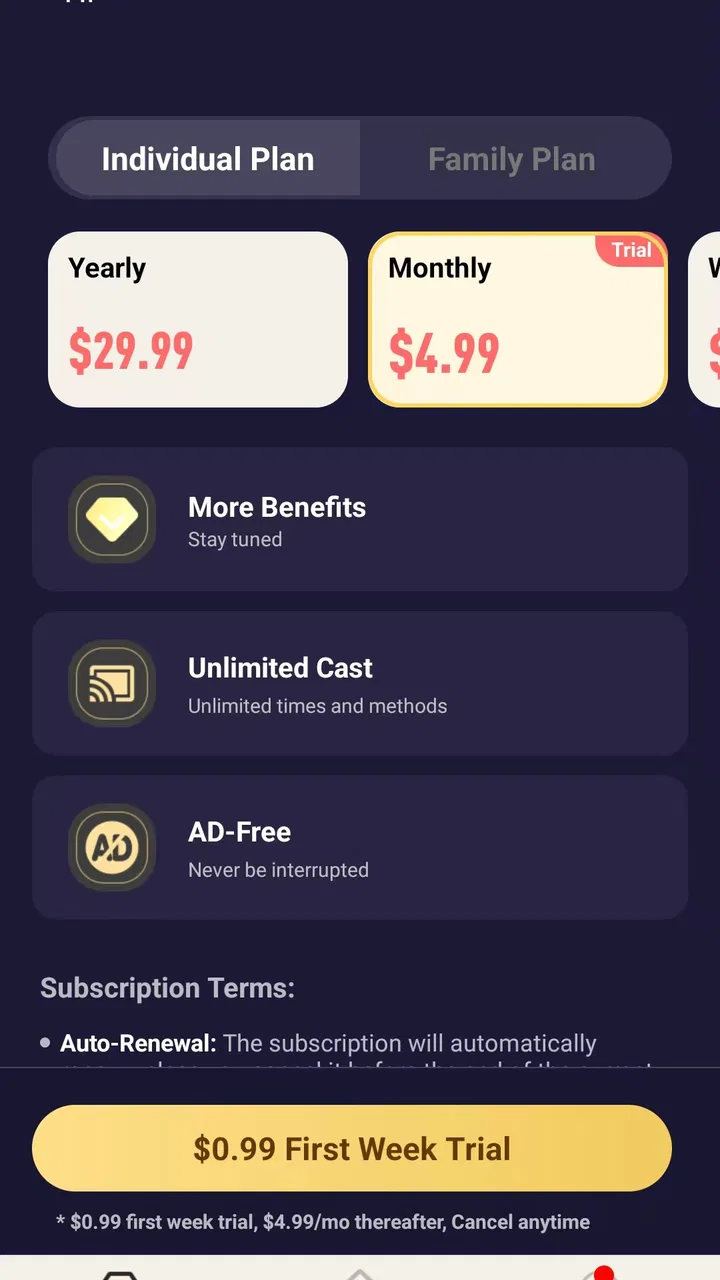
Because the app is free to download but includes in-app purchases priced from $1.99 to $49.99 per item, I would pay attention to any purchase screen during use. A free installation does not necessarily mean every part of the experience is free. In a family setting, that makes it sensible for the account holder to handle setup and review purchase prompts before handing the phone to a child or guest.
Children, older relatives, and trust
The Everyone age classification makes TVCastHub suitable in a broad age context, but an age label should not be confused with a complete family-safety system. The app’s job is casting, not supervising what people search for or watch through every possible video source. Parents should still guide younger users toward appropriate content and keep control of the account used to install or purchase anything.
For older relatives, the phone-based model can be easier than navigating a television interface if they already know how to open a video on a handset. I would set up the connection in advance, place the app where it is easy to find, and explain only the essential sequence: open the video, choose the cast option or destination, and stop casting when finished. Too many simultaneous devices or unclear screen names can make the process feel harder than it needs to be.
For children, the strongest household benefit is convenience rather than independence. A parent can keep the controlling phone and choose what appears on the TV, while the child watches from the shared screen. The weaker side is that the app does not replace supervision. If a child is given the phone, they may still be able to browse beyond the intended video source, so the family should rely on the source’s own controls and ordinary device supervision.
Trust also matters between adults. In a shared home, a casting session can be interrupted by someone else connecting or changing the selected content. I would avoid assuming that every person in the household understands the current session. A quick announcement such as “this phone is controlling the TV” prevents accidental interruptions and makes the app feel more predictable.
Where it differs from usual alternatives
The most direct alternative is the casting button already built into many video apps. Those built-in controls are often the better choice when the service supports the television natively, because they are tied closely to that service’s playback system. They may also provide clearer session handling and fewer steps.
TVCastHub becomes more appealing when you want a dedicated tool for the casting task rather than repeatedly looking for different controls in different apps. Its value is convenience and centralization, not exclusive access to content. If your television already has excellent native apps and your preferred services cast reliably, installing another tool may add little.
A second alternative is a cable or adapter. Wired connections are less dependent on wireless discovery and can be more dependable for important presentations, but they require the right hardware and restrict movement. TVCastHub is more comfortable for casual household viewing because the phone can remain in someone’s hand, although wireless casting introduces its own network and compatibility variables.
Screen mirroring is another comparison point. Mirroring duplicates more of the phone’s display, while casting a video can be a cleaner experience when the source supports it. The trade-off is that casting may not behave the same way for every type of content. If the goal is to show a photo gallery, a document, or an app interface rather than a video, I would check whether TVCastHub handles that task as expected instead of assuming its video-focused purpose covers everything.
These distinctions help define who should skip it. I would look elsewhere if you need guaranteed presentation reliability, detailed parental controls, a multi-user household dashboard, or a single solution for every kind of screen sharing. I would also skip it if your current television apps already solve the problem without friction.
Practical habits that make the experience better
My first practical tip is to prepare the network before troubleshooting the app. Keep the phone and display on the same local connection, avoid switching networks during playback, and temporarily move closer to the television during discovery. This does not guarantee a connection, but it removes several common causes of failure before blaming the app.
My second tip is to separate discovery from viewing. Find the television first, confirm that it is the intended screen, and only then search for the video. Doing everything at once is faster when it works, but separating the steps makes mistakes easier to diagnose in a busy home.
My third tip is to create a handoff routine. The person who starts the session should tell everyone which phone is controlling it, keep that phone available, and disconnect when the viewing ends. This is particularly useful in homes where several people use the same TV and prevents the next person from wondering why an old session is still active.
A fourth trade-off is worth remembering: the phone remains part of the experience. That is convenient for choosing content, but it can also become a distraction, a battery drain, or a point of failure. For a short clip, this barely matters. For a long program, I would keep the phone charging and avoid switching between networks or aggressively closing the app.
Another sensible habit is to review purchase prompts before letting someone else use the device. TVCastHub costs nothing to install, yet its optional purchases range from a small amount to a considerably larger one. In a shared household, the person responsible for the store account should be the one who completes setup and decides whether any paid item is worthwhile.
What the current release suggests
The app is currently at version 1.0.3, which places it early in its development. I see that as a reason to keep expectations practical. Early releases can improve quickly, but they may also feel less polished around edge cases such as unusual televisions, complicated home networks, or switching between several users.
Its public reception is mixed, with an average of 2.9 from roughly thirty ratings and a dozen written reviews. That does not tell me exactly how every problem occurs, but it does suggest that the experience will not be equally smooth for everyone. I would treat TVCastHub as something to test with your own phone and television rather than as a guaranteed fix for every casting situation.
The install base is still modest at over ten thousand installations, so I would be especially cautious about making it the only method for an important event. For ordinary evenings, experimentation costs little because the app is free to start. For a work presentation, a family celebration, or a paid venue, a proven wired connection or the display’s native solution is the safer choice.
That early-stage position does not make the app useless. It simply changes how I would recommend it. Try it first with a household video, learn how your particular TV appears in the device list, and keep a backup option available. Once the workflow is familiar, the app can become a handy shortcut even if it is not the most sophisticated casting product available.
My household verdict
After looking at the app through a shared-home lens, I see TVCastHub as a focused convenience tool rather than a complete answer to home streaming. It is most useful when one person has content on a phone and several people want to watch it on a larger screen without sharing personal accounts on the TV. The phone-first workflow is approachable, and the free entry point makes testing straightforward.
I would recommend it to someone who regularly shares videos with family or friends, has a compatible display, and is comfortable doing a little network preparation. It can be particularly handy for casual clips, spontaneous viewing, and households where different people use different accounts. The best results come from clear device roles, one controller at a time, and a charged phone kept nearby.
I would not recommend relying on it blindly. The middling 2.9 average, early version, optional purchases, and dependence on the receiving screen all point to a product that deserves a trial before it becomes part of your routine. People who need strong supervision tools, guaranteed reliability, or broad screen-sharing coverage should choose a more specialized alternative.
My final view is cautiously positive: TVCastHub is worth trying when the problem is simply getting a phone-found video onto a shared TV. It is not a replacement for every native casting feature or wired connection, but it can make an ordinary household handoff less awkward. Used with sensible account boundaries and a little coordination, it has a clear place in the toolbox; used as a universal solution, it is likely to disappoint.
FAQs for TVCastHub
01What is TVCastHub and what can I use it for?
TVCastHub is designed to help users stream or cast video content from a mobile device to a compatible television or larger display. Depending on the version and supported services, it may work with smart TVs, streaming devices, or wireless display technologies. Before downloading, check the app description carefully to confirm that your television model, phone, and preferred video sources are supported.
02Is TVCastHub compatible with Android and iPhone devices?
Compatibility can vary according to the operating system version, device model, and the casting technology used by your television. TVCastHub may be available for Android, iOS, or both, but users should verify the official store listing before installing it. Some features may also differ between platforms, particularly screen mirroring, media playback, permissions, and support for specific smart TV brands.
03Does TVCastHub require a smart TV or additional hardware?
In most cases, casting applications such as TVCastHub require a compatible smart TV, streaming stick, set-top box, or another receiver connected to the television. Your mobile device and the receiving device generally need to be connected to the same Wi-Fi network. If your TV does not support the required casting standard, an additional compatible streaming device may be necessary.
04Is TVCastHub free to download and are there in-app purchases?
The availability of free features, advertisements, subscriptions, or one-time purchases may depend on the platform and the current version of TVCastHub. Some casting apps allow basic use at no cost but reserve advanced options, ad removal, premium media support, or unrestricted mirroring for paid users. Review the store page and purchase terms before confirming any payment.
05Why might TVCastHub fail to find my TV or stop during playback?
Connection problems are commonly caused by devices being connected to different Wi-Fi networks, disabled local-network permissions, an unsupported TV model, outdated software, or interference from a VPN or router settings. Restarting both devices, updating the app and television, and checking network permissions can help. Playback may also be limited by copyright protection or restrictions imposed by the video service.
Pros
- Supports streaming from multiple TV and video sources in one app.
- Simple interface makes browsing and starting playback easy.
- Useful casting controls for pausing
- seeking
- and adjusting volume.
- Works well for users who prefer watching content on a larger screen.
- Convenient way to organize frequently used channels or streams.
Cons
- Compatibility may vary between devices
- TVs
- and casting receivers.
- Some streams can load slowly or stop because of source-side issues.
- The app may depend heavily on a stable
- fast internet connection.
- Free access may include advertisements or limitations on certain features.
- Content availability can differ by region and may change without notice.

TVCastHub
Gallery